

Cyber Security Engineer
⚡ Includes 2 x Free Professional Qualifications
Cyber Security Technologist Apprenticeship – Pathway 1
🔐 Technology focused
🎓 Level 4
⌛ 18 months + Assessment
💻 Live Virtual Learning (approx 2 hours training per week)
📊 Off The Job Training (approx 4 hours per week)
🏷️ £Free – £18,000 – Check Funding

Introduction
The Cyber Security Technologist Standard (2021) has three distinct pathways to choose from;
(1) Cyber Security Engineer, (2) Cyber Risk Analyst, (3) Cyber Defender & Responder. Here you can explore the Cyber Security Engineer option…
Cyber Security Engineers are technology orientated, designing, building and testing secure networks or security products or systems. They focus particularly on the security aspects of a design.
They engage with stakeholders, including suppliers, customers, and technical and non-technical teams. They develop and apply practical knowledge of information security to deliver solutions.
Our apprenticeship equips individuals with essential security concepts, technologies, and risk mitigation strategies, enabling them to achieve cybersecurity outcomes within legal and regulatory frameworks. This role is critical to protecting organisations from evolving cyber threats.
Who can do this apprenticeship?
This apprenticeship is designed for individuals working in cyber security positions, protecting digital environments and managing security threats.
Apprenticeship candidates are likely to be working as:
- Cyber Security Engineer
- Cyber Security Consultant
- Cyber Security Architect
- Cyber Security Analyst
- Cyber Security Specialist
- IT Security Technician
- Embedded Engineer
Candidates will need to…
- Be employed in or being hired into a job role with cyber security responsibilities
- Be working on real-world cyber security projects to showcase their knowledge and skills
- Have support from their employer to dedicate approximately 8 hours a week to training
✅ Core content
- Understand the use of Service Level Agreements
- Diagram network topologies
- Examine network protocols, vulnerabilities and mitigation techniques
- Plan network diagnostics
- Apply cryptography principles and techniques
- Categorise network attacks and exploits
- Create network troubleshooting strategies
- Create threat modelling strategies
- Troubleshoot using the OSI and TCP/IP models
- Ensure compliance with business legislation
- Apply network services in line with security protocols
Additional specialist content
- Assess the effectiveness of systems and tools
- Enhance security through subnetting
- Evaluate attack scenarios using a security case
- Understand functional and non-functional security
For more information you can visit Skills England and browse the full Level 4 Cyber Security Technologist Apprenticeship Standard.
⚡ Included Professional Qualifications (free of charge)
We’re committed to maximising the impact of our apprenticeships and include professional courses (at no extra cost) in the majority of our apprenticeships. These give apprentices industry-recognised qualifications that enrich learning, build confidence and deliver even greater value organisations.
The following Professional Qualifications are now included with this apprenticeship:
Each course comprises of additional learning, live online with a trainer, exam preparation and the final exams. For more information see our Additional Professional Qualifications page.
🖥️ Tools and Technologies
The following systems, tools and software are required for apprentices to effectively participate in and complete their apprenticeship…
- Microsoft Office (Word, Excel, PowerPoint)
- Microsoft Teams
- OneFile e-portfolio (web-based)
- Web browser (for Mac users Chrome is recommended)
- Questionmark – for remote proctored examinations with BCS
- Practice Labs
- Latest version of Cisco Packet Tracer (available to download via NetAcad accounts once created)
- Wireshark
- Hyper-V Manager (should be enabled to allow the creation of virtual machines, in line with minimum system requirements). Alternatively, VirtualBox may be used; however, all labs are delivered using Hyper-V.
- Kali Linux (to be used within a contained virtual machine)
- Parrot Linux (to be used within a contained virtual machine)
The following tools and applications are recommended to support learners throughout their apprenticeship…
- Sysinternals Suite
- Microsoft Message Analyzer
- PowerShell ISE
- Python 3
🟢 Live online learning
Our interactive live, online training model is designed to create a flexible learning environment without losing any of the benefits of in-person teaching. An apprenticeship with LearnTech typically looks like…
- Live weekly online sessions – 2 hours per week
- Off-the-job training (OTJT) - Weekly hours are programme specific (see top of page)
- Immersive learning experience through Microsoft Teams Classroom
- Maximum classroom size of 12 ensures a highly effective trainer to student ratio
- Monthly 1 to 1 mentor meetings
- Maths and English - if required
▶️ Discover more with our 5 minute Typical Week in Training video.

Neil Brighton
Head of Department Infrastructure,
Cyber and Networking
Neil is a Head of Department and a technical trainer at LearnTech, responsible for the development of infrastructure apprenticeships. Since starting a career in education in 2002, Neil has been dedicated to sharing his expertise in computing, teaching a wide range of subjects from ECDL and Level 3 qualifications to Postgraduate Degrees.
Before joining LearnTech, Neil managed the Digital and Computing Department at his local college and university centre, demonstrating his leadership and commitment to student success. His interests lie in Cyber Security and Networking, plus he enjoys specialising in PC builds and installs.
Neil’s blend of technical knowledge and hands-on teaching experience ensures his students gain both the theoretical understanding and practical skills they need to thrive in today’s IT industry.
View Course Brochure

View Course Infographic
Key information all on one page…
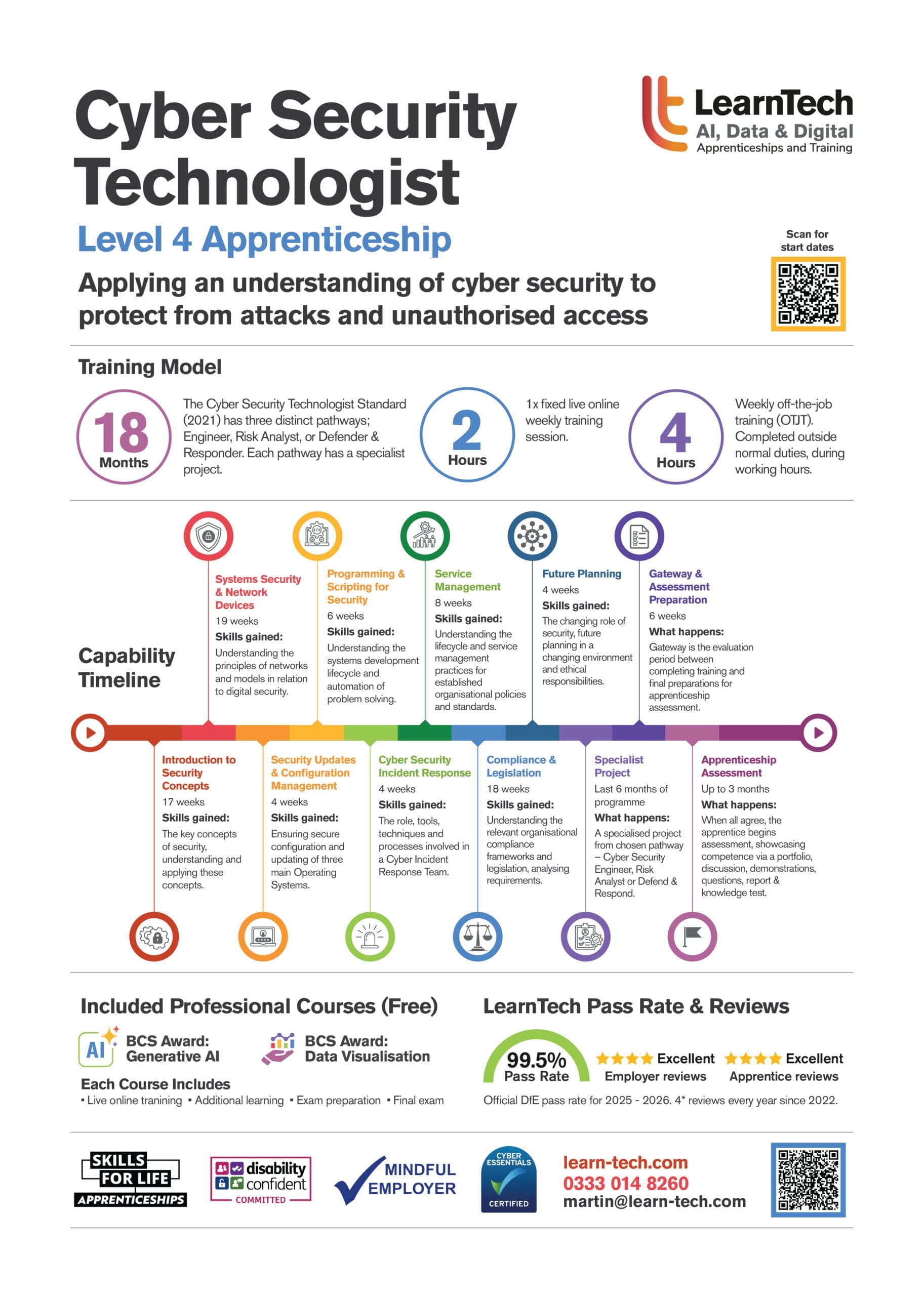
Apprenticeship Timeline
The modules shown in the timeline below will be covered by all apprentices on this programme.
Use the arrows on each side below to navigate.
Why employers choose LearnTech…

Ready to find out more?
Contact us to book a no obligation Information Session…
Employer Contact Form
Tech apprenticeships offer a great way for your business to develop skilled employees tailored to your organisation’s needs. We’re here to support you in all aspects of your tech and data apprenticeship needs.
If you’re ready for a no obligation Employer Information Session via Teams, or would just like more details at this stage, please complete the form below and we’ll be in touch!
Potential Apprentice (Employed) Contact Form
If you're currently employed in a role that offers experience related to the apprenticeship you’re interested in, please fill in the contact form below and we'll be in touch soon!
An apprenticeship is a job with training leading to a qualification. So, if you’re NOT currently employed in a suitable role, here are the three main ways to start an apprenticeship...
1 - Apply for an apprenticeship vacancy. Visit our Apprenticeship Vacancies Page to view our current opportunities. You can also explore all available apprenticeship vacancies in England using the government website findapprenticeship.service.gov.uk, where you can filter by your interests and location, plus save your searches and get email alerts for new vacancies.
2 - Talk to your current employer. If you're interested in an apprenticeship as part of your career development, speak with your employer. Following this, you can contact us to book an information session to find out more about the programmes you’re interested in.
3 – Approach another employer. Consider approaching a potential employer with a proposal to join their team as an apprentice. Many have succeeded with this approach, showing their enthusiasm for work and learning.
For more information about becoming an apprentice, explore our Apprentice Guide.
We wish you the best of luck in your future career 🙂
Trusted by…




























Employer comments

Employing tech apprentices enable career development and allows for better integration into the team and organisation.
It’s really good to see the appetite to learn from them and they exceed our expectations.
Our experience with LearnTech has been excellent.
I’d advise other employers considering taking on an apprentice to ensure the apprenticeship is planned out as much as possible and use mentors to help make it a success.

Bringing a UX apprentice into our team has delivered clear benefits and has helped us address a long-standing challenge in recruiting people with the right skills locally.
After struggling to find candidates with the UX capabilities and practical experience we needed, we made the decision to 'grow our own talent' and Jess has proven herself to be a really valuable member of the team.
She’s been productive from day one, reducing pressure on existing staff.
Jenny Syrett
Senior UX Manager

LearnTech has been an outstanding partner in supporting our learning and development goals.
Every member of their team is dedicated to the success of learners, creating an experience that is not only professional but truly impactful.
This learner-centred approach makes their services stand out and ensures that individuals feel supported throughout their journey.
We highly value their expertise and collaborative spirit in meeting the council’s needs.
Agnes Bailey
OD Consultant

Dylan was the first apprentice we’d taken on, and it was as much a learning experience for the company as for him.
It has certainly sold us on the benefits of apprenticeships, and we see it as a great way to recruit and develop new employees. The return on investment is worth it, but it’s also great to be able to do something to help people get started in the industry.
Dylan was our first apprentice, he definitely won’t be the last.
Jon Gooch
Senior Developer

We’ve been employing tech apprentices for a couple of years and the benefits are clear - career development, an improved training culture, better skills across the team and valuable knowledge sharing. We’ve seen returns as early as mid-course, with full ROI within a year.
The most rewarding part is watching apprentices grow and support colleagues, while consistently meeting our expectations. On completion of their apprenticeship, they typically go on to special projects with potential for career progression.
Our advice to other employers - keep apprenticeships part of daily conversations, not just for quarterly reviews. Embed their learning into day-to-day activities.
Our experience with LearnTech has been great, and we’ve enjoyed working with them.

Our experience with tech apprenticeships is positive. Apprentices contribute to career development and improve our training culture. We typically see a return on investment within six months and they often exceed our expectations, taking on greater responsibility.
The most rewarding aspect is seeing their growth, personally and professionally. For example, Matt began his apprenticeship two years ago, has gone from strength to strength, achieved a Distinction and is now employed as a Data Analyst. His willingness to learn has been invaluable.
I encourage other employers to explore all the apprenticeships LearnTech offers - our experience with them has been very good.
Oliver Hosking
Senior Data Analyst

We've been employing tech apprentices for over three years and the most rewarding part is watching them grow, taking ownership of projects and eventually running with them independently. Our apprentices consistently exceed expectations, often taking on more responsibility than originally outlined. Zeb and Ellie, for example, have earned promotions within the company and distinctions across three apprenticeships.
LearnTech has been a great training partner. Our apprentices are happy and we've been consistently impressed with their progress. My advice to other employers - give your apprentices every opportunity to grow and prove themselves. The results speak for themselves.
Adam Archer
Intelligence Delivery Team Lead

We've been super happy with LearnTech as a provider. As this is our first time employing apprentices within our organisation, the pathway from the day 1 engagement, through onboarding and into the apprenticeship programme itself has been clear and well supported.
Our apprentices have brought new and fresh perspectives into the business. Their innovative ideas help keep us current and complement our more experienced team members. It's great to have a pipeline or new talent, whom we can help nurture and grow, and we hope our apprentices will want to forge long term careers with us.
Caroline Topper
COO

We’ve been employing tech apprentices for over two years. One of the biggest benefits is the ability to bring in short-term, funded roles that allow us to assess candidates' potential for permanent positions.
The most rewarding aspect is watching individuals at the start of their careers develop valuable skills and experience, that will stand them in good stead for the future.
LearnTech has been very good to work with. For other employers, I’d advise being clear on the level of apprenticeship you recruit for. It makes a significant difference to the apprentice’s starting point and their ability to contribute.
Service Portfolio Manager

Throughout the cohort with LearnTech, our apprentices have been supported and nourished as learners. The weekly classroom sessions have worked wonderfully with our apprentices being able to ask relevant questions when it matters.
Throughout their journey, their mentor has been a massive help of ensuring our apprentices are on target and raising concerns when needed. So much so, we have requested them to mentor our next cohort of apprentices. We look forward to another fantastic year with LearnTech!
Ash Lavington
Service Desk Manager

Our experience with LearnTech as our training provider has been great. For employers considering a tech apprentice, my advice is to plan meaningful, engaging projects that not only interest the apprentice but also provide real value to the team.
Vikki Armstrong
Head of Digital Relationship Management
Calum, achieved a distinction in his apprenticeship and has become a trusted team member, regularly taking on additional responsibilities. LearnTech has been amazing. Georgina has kept me well-informed throughout and I’m grateful for the support throughout.
For any employer considering a tech apprentice, I’d say it’s a truly rewarding experience.

Our experience with LearnTech has been very good—professional service, knowledgeable trainers, and positive feedback from our apprentice throughout. We’re already planning to take on more apprentices through LearnTech in the future. They have given a professional, high-quality service, with our apprentice finding the course good and the trainer knowledgeable.
Tom Broadbent
Head of Digital Transformation

Apprenticeships support career development, strengthen our workplace culture and align well with our focus on renewables and training. The most rewarding part is watching apprentices grow in confidence and learn to collaborate with others. Typically, they take on additional responsibility through project work alongside their formal training, and many go on to further training or receive promotions.
Our experience with LearnTech has been great - straightforward and supportive throughout. To employers considering a tech apprentice - make sure you truly have the time to train them properly or a reliable team who can. The effort is absolutely worth it.
